6/18/2013

Mongo Math

以下介紹一些常用到的指令
$gt: greater than 大於           $gte: greater than and equal to 大於等於      
$lt: less than       小於           $lte: greater than and equal to 小於等於

以下用到的練習的collection名稱為school (學校)
document(文檔)包括: department(系所),  professor(教授姓名), student(學生姓名),  field(研究領域), grade(年級), point(學分數)

Greater than 大於

在Mongo Shell裡可以用db.school.find ({ "point" : {$gt : 20} });
例如   搜尋學分數大於20的學生資料
下列練習可以發現command line將學分數為40, 33, 25, 36的紀錄都列出來


在Java中若要找學分數大於30的紀錄,可使用
DBCollection coll = db.getCollection("Collection Name");
DBObject query = 
new QueryBuilder().put("Document Name").greaterThan(Value).get();

如
DBCollection coll = db.getCollection("school");
DBObject query = new QueryBuilder().put("point").greaterThan(33).get();

Greater than and equal to 大於等於

在Mongo shell裡面使用 $gte,在Java則使用
DBObject query = 
new QueryBuilder().put("document name").greaterThanEquals(Value).get();
在Concole可以看到把學分數(point)為40, 33, 46的紀錄都列出來了


Less than 小於

類似Greater的語法  這裡假設找出學分數小於33的紀錄
使用DBObject query = 
new QueryBuilder().put("point").lessThan(33).get();


Less than and euqal to 小於等於

在Mongo shell可使用$lte,在Java則使用lessThanEquals(Value)
DBObject query = new QueryBuilder().put("point").lessThanEquals(33).get();
這個練習把學分數等於33的紀錄也列出來


下圖分別列出小於20跟大於20的練習


介於兩數值之間

若要查詢介於某個數值跟某個數值之間
例如大於20且小於40
則可用    db.school.find ({ "point" : {$gt : 20,  $lt:40} });


6/15/2013

Mongo Advanced Search

In my test databasse, 
collection: testPatientInfo
document: testName (姓名), testID (身份證字號), testAge (年齡), testAddress (地址)
embedded document (內嵌文檔) of testAddress are: testNo (門牌號碼), testStreet (路名), testCity (城市), testCountry (國家), zip code (郵遞區號)

We are going to search the patient who lives in Taipei City, then we can use
db.Collection.find( { "Document.embedded document" : Value} );
In Mongo shell, the we can type
db.testPatientInfo.find( { "testAddress.testCity" : "Taipei"});


交集/ A且B

找學生為四年級且有40學分的紀錄
the student who is in 4th grade and has 40 points
由結果發現找出一筆符合的紀錄


找出特定搜尋條件的紀錄

找出學生姓名(student)為Hsu的學生的紀錄
DBObject query = new QueryBuilder().put("grade").is(4).get();


Not equals 

找出學生姓名不為Hsu的紀錄
DBObject query = new QueryBuilder().put("student").notEquals("Hsu").get();

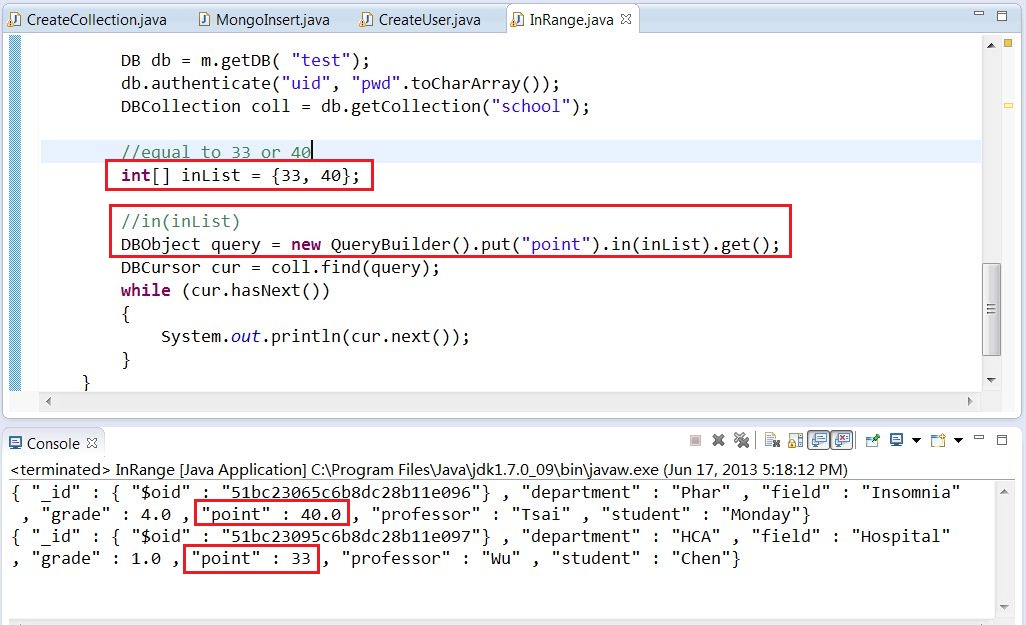
$in/ in(inList)方法

db.CollectionName.find( {Document Name: [value1, value2, ...]})
找school表中學分數(point)為8, 13, 40紀錄
db.school.find( {point: [8, 13, 40]} );


$nin/ notIn(inList)

在Mongo shell中用 $nin,列出不包含這些資料的紀錄

在Java中可用notIn(inList)

skip方法


Mongo Basic Search

以下是Mongo shell簡易查詢的一些練習
我先自行建立虛擬的學生資料
collection為school (學校)
document(文檔)包括: department(系所),  professor(教授姓名), student(學生姓名),  field(研究領域), grade(年級), point(學分數)

升冪與降冪

若要將某文檔的數值由小到大(升冪)或由大到小(降冪)排列
例如:將年級升冪排列
db.school.find().sort( {grade: 1} );
查詢到的學生資料,可以發現他們的年級依序為1, 2, 3, 3, 4, 4

若是將年級降冪排列,則把上倏地{grade: 1}改為{grade: -1}
db.school.find().sort( {grade: -1} );
查詢到的學生資料,可以發現他們的年級依序為4, 4, 3, 3, 2, 1


更換document的值

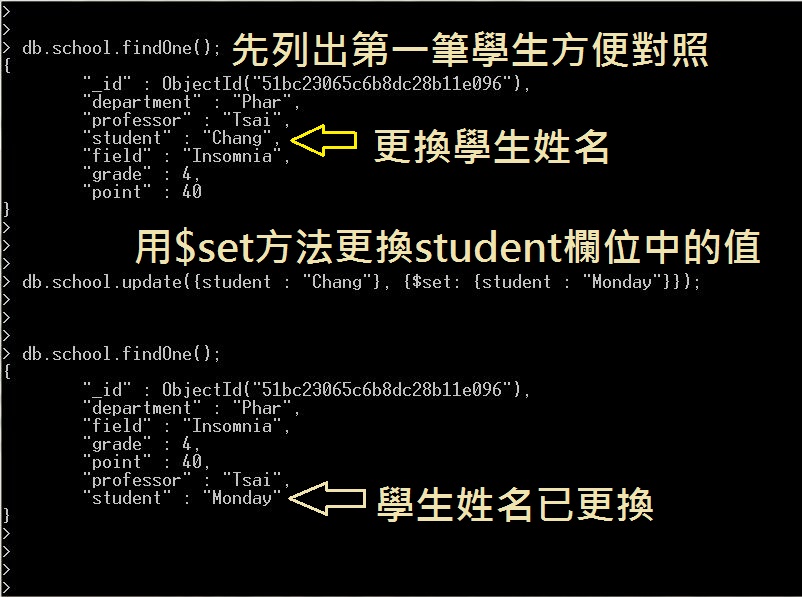
假設有學生的名字誤值, 要更換學生姓名,可用$set方法,並用update更新database
以下我們把學生姓名為Chang的資料改為Monday
db.school.update({student : "Chang"}, {$set: {"student" : "Monday"}});


以上練習參考自MongoDB管理與開發精要(機械工業出版社)    並搭配自己使用的範例做練習

11/20/2012

Brief Introduction of MonjaDB

Connecting to MongoDB on MonjaDB


在 MonjaDB (MongoDB GUI client tool) 這個網頁中有詳細說明每一個視窗的用途。以下則是我在測試MonjaDB的一些畫面。


Monja雖然有JavaScript on MongoDB Server的功能,但老實說我在Monja上運行Java始終不成功,所以我還是切換回Eclipse的Java操作畫面,執行程式後,再切換回Monja重新reload datase,功能跟Mongo shell中使用show dbs是類似的。


MonjaDB的安裝方法非常簡便,請參考MonjaDB Installation。

MonjaDB Installation


MONJADB from Eclispe Marketplace

Eclipse UTF-8 Encoding Prolems

在使用Eclipse的時候發現,若直接匯入.java檔案,原先的中文註記在匯入後會出現亂碼。上網找了一些資料,發現解決方式不難,只要依照以下步驟就可以解決UTF-8的問題。
首先,開啟Eclipse,選擇上工具列的Windows,然後點選Preferences。


接著會跳出新視窗,點選左方工具列的General -> Workspace。
在Workspace中的Text file encoding使用的是預設的Default(GBK)。


將原先預設的Text file encoding改為其他(Other)。在參考的網頁中,都是將編碼改為UTF-8 -> Apply -> OK,然後重新啟動Eclipse,原有的亂碼就會變成繁體中文,可是我試了之後,並沒有改變,只是原有的亂碼變成另一種字型的亂碼。

我的解決方式是一樣選擇其他,但是自行輸入MS950 -> Apply -> OK,也不需要重新啟動,亂碼就全部變成繁體中文了。我的Other清單中並沒有MS950的選項,自行輸入後,就會加到清單裡面了。


參考網站

UTF-8 設定

Eclipse Community Forums

設定Eclipse UTF-8環境

[問題] 中文utf-8與big5互轉的問題

【Eclipse】MS950轉UTF-8亂碼解決方法 中文亂碼

【Eclipse】中文亂碼解決方法:環境編碼設定 UTF-8


11/19/2012

MongoVUE

MongoVUE is designed as a GUI tools for MongoDB.


11/13/2012

MongoDB Installation


ADD EXTERNAL ARCHIVES

Search for Java and Mongo connection driver from the Internet.
I downloaded the driver from this Github.
下載後不需要解壓縮


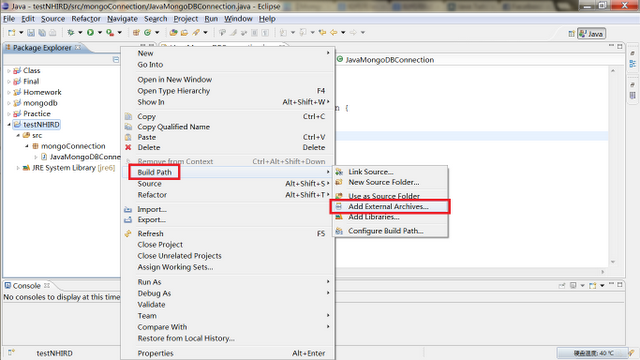
Right click -> Build Path -> Add External Archives


Select all files and double-click on the zip file named mongo-2.9.3(不需要解壓縮)


11/12/2012

JAVA AND MONGODB CONNECTION

開啟eclipse


Create a Project: File -> New -> Project


create a Project name (ex. testNHIRD)


 Create a Package under src of Java Project (ex. testNHIRD)


Give a name for Package (ex. mongoConnection)


Create Class


Give a name for Class (ex. JavaMongoDBConnection)


The screen look like the following picture


Use "add external archives" to add Java and MongoDB driver

Please see ADD EXTERNAL ARCHIVES

Then type codes as follows
You can also take Making A Connection from MongoDB tutorial website as a reference


Other useful websites

Java Tutorial of MongoDB

Java + MongoDB Hello World Example